
AnyDate

Any Date, Any Format, Anywhere – Quickstart Guide
Installing the Plug-In

Installing the Plug-In

You should have installed your Infusionsoft Pocket Developer plug-in using the instructions provided when you purchased the plug-in.

If, for any reason, you have not installed your Pocket Developer plug-in, follow these simple instructions, to learn how.

Configuring the HTTP Post Snippet
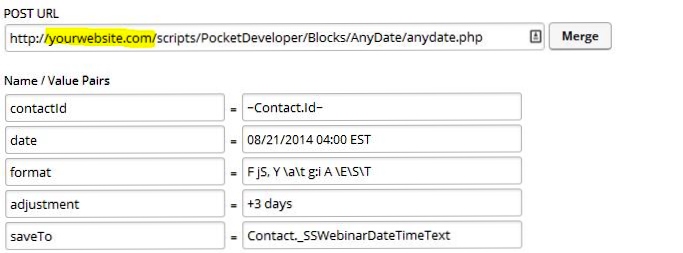
any-date

NOTE: Everything in an HTTP POST is case sensitive. That includes the URL, the parameters on the left and the field names on the right. If caPitaLizaTion is wrong, your post will not work.


ANOTHER NOTE: The merge field in the saveTo parameter (and the date parameter if you are using a merge field) should never have tildes around it (~). If you use the merge button to add a field, make sure to remove them for these parameters.

URL:

The URL, on your server, where the Pocket Developer script is stored. For example:

https://yourdomain.com/scripts/PocketDeveloper/Blocks/AnyDate/anydate.php

Required Name Value/Pairs:

date

    This field should contain one of the following:
  • A text string representing a valid date or date and time, such as “January 1, 2014 1:04 PM” or “01/01/2014 01:04:33 PM” or “January 1st, 2014″ or “01/01/2014″ etc.
  • The text “today”, which will result in using the current date or “now”, which returns current date and time.
  • A custom field that is holding a date, date/time value, or a text representation of a date, such as Anniversary, Birthday, or _MyCustomDate
  • NOTE: If you merge in a dateTime field for this value, only the date will be extracted.

    format

    • The format is made up of codes, specified by PHP.
    • Examples of valid codes are:
      • Y-m-d\TH:i:s // This is Infusionsoft’s date format and MUST be used for any Infusionsoft date or dateTime field
      • d-m-Y // returns 22-09-2014
      • F jS // returns Thursday, September 22nd
    • See sections below for more date time codes and formats

    saveTo (Optional if using ‘request’)

    • This is the field where the result of the formatted date will be stored, such as Anniversary, Birthday, _MyCustomDate or _webinarPrettyDate

    contactId

    • This is the contact Id for the contact record where fields will be retrieved (if any) and where the formatted date will be stored

    Optional Name/Value Pairs:

    time

    • This field should contain one of the following:

    1. A time or date & time which is structurally valid among common standards, such as “January 1, 2014 1:04 PM” or “01/01/2014 01:04:33 PM”
    2. A merge field containing a valid text representation of a time or date and time, per #1 above.
    3. The text “now” which will result in using the current time
    4. An Infusionsoft dateTime field, such as _WebinarDateTime

    NOTE: If you merge in a dateTime field for this value, only the time will be extracted. Also, if you include a supported timezone code in your time value, please make sure it is using all capital letters (unless it’s an identifier), and that it appears as the last item in the time field. This will be overridden by any timezone values in the timezone parameter, if supplied. If no timezones are designated, assume that all times are in Eastern Time as is the standard with Infusionsoft.

    adjustment

    • The “adjustment” field should provide a relative date format string similar to PHP’s strtotime function.
    • Some valid examples of this value are “+5 weeks” or “second month” or “last day of next month” or “yesterday noon”
    • See below for more examples of valid adjustments

    timezone

    • When the date & time fields are not based on Eastern Time, the user may designate the appropriate originating timezone with any of the supported timezone codes/identifiers specified in the “Supported Timezone Codes” section.
    • Timezone abbreviations should always be in all capital letters, unless using identifiers. If no timezone is supplied, it is assumed to be Eastern (see list of Supported Time Zone Codes below)

    convertToTZ

    • In the event that the user would prefer to have a time automatically adjusted to some other timezone, they may supply a timezone code/identifier within this parameter following the same rules that apply to the timezone parameter above. (see list of Supported Time Zone Codes below)
    • Adjustments made to the date/time with the “adjustment” parameter are made after the timezone conversion is completed.

    request

    • This is a URL to query at the end of the operation. The merge field {result} can be placed anywhere within the URL to include the result of the operation, allowing you to pass the value to another script

    Demo Video

    Demo Video

    Common Date Formats

    Common Date Formats

    NOTE: If the saveTo field is a Date or DateTime field, you MUST use the Infusionsoft date/time format of Y-m-d\TH:i:s. If your post is running but not populating the field, this is the likely culprit.

    Assuming date is 09/22/2014 and time is 08:00 and server is using Eastern Time Zone:

    • Y-m-d\TH:i:s // This is Infusionsoft’s date format and MUST be used for any Infusionsoft date or dateTime field // returns 2014-09-22 08:00:00
    • m-d-Y // returns 09-22-2014
    • d-m-Y // returns 22-09-2014
    • F jS // returns Thursday, September 22nd
    • m jS // returns Sep 22nd
    • Ymd // returns 20140922
    Common Date Formatting Codes

    Common Date Formatting Codes

    Below is a summary of the most common date and time codes you can use in the format parameter of Any Date, Any Format, Anywhere. Remember they ARE CaSe sEnsItIVe:

    DAYS
    d – day of the month 2 digits (01-31)
    j – day of the month (1-31)
    D – 3 letter day (Mon – Sun)
    l – full name of day (Monday – Sunday)
    N – 1=Monday, 2=Tuesday, etc (1-7)
    S – suffix for date (st, nd, rd)
    w – 0=Sunday, 1=Monday (0-6)
    z – day of the year (1=365)

    WEEK
    W – week of the year (1-52)

    MONTH
    F – Full name of month (January – December)
    m – 2 digit month number (01-12)
    n – month number (1-12)
    M – 3 letter month (Jan – Dec)
    t – Days in the month (28-31)

    YEAR
    L – leap year (0 no, 1 yes)
    o – ISO-8601 year number (Ex. 1979, 2006)
    Y – four digit year (Ex. 1979, 2006)
    y – two digit year (Ex. 79, 06)

    TIME
    a – am or pm
    A – AM or PM
    B – Swatch Internet time (000 – 999)
    g – 12 hour (1-12)
    G – 24 hour c (0-23)
    h – 2 digit 12 hour (01-12)
    H – 2 digit 24 hour (00-23)
    i – 2 digit minutes (00-59)
    s 0 2 digit seconds (00-59)
    T – timezone (Ex: GMT, CST)

    Date/Time Adjustments

    Date/Time Adjustments

    Assuming date is 09/22/2014 and time is 08:00 and server is using Eastern Time Zone:

    • +1 day // returns 09/23/2014 08:00
    • +1 week // returns 09/29/2014 08:00
    • -17 hours // returns 09/21/2014 15:00
    • +1 week 2 days 4 hours 2 seconds // returns 10/01/2014 8:38 PM
    • next Thursday // returns 09/25/2014 00:00
    • last Monday // returns 09/15/2014 00:00
    • third Thursday of next month // returns 10/15/2014 00:00

    Supported Timezone Codes

    In the event you can’t find a timezone for your region within the list below, you may also use any of the timezone identifiers supplied at this PHP documentation page; some examples of these identifiers are America/New_York, Canada/Atlantic, etc.

    United States
    Code Timezone, State, or Region Notes
    ETUS Eastern Time No exclusions
    CTUS Central Time No exclusions
    MTUS Mountain Time Excluding Arizona
    AZUS Arizona (No DST) No exclusions
    PTUS Pacific Time No exclusions
    ATUS Alaska Time No exclusions
    HTUS Hawaii/Aleutian Time Excluding Honolulu
    HONOUS Honolulu No exclusions
    Australia
    Code Timezone, State, or Region Notes
    WTAU Western Australia Time; Western Australia Excluding Eucla
    EUAU Eucla, Australia Time; Western Australia No exclusions
    NCTAU North Central Australia Time; Northern Territory No exclusions
    SCTAU South Central Australia Time; South Australia No exclusions
    NETAU North Eastern Australia Time; Queensland No exclusions
    SETAU South Eastern Australia Time;
    New South Wales, Victoria, and Tasmania
    No exclusions
    New Zealand
    Code Timezone, State, or Region Notes
    NZ New Zealand Time No exclusions
    Europe
    Code Timezone, State, or Region Notes
    WTEU Western European Time Excluding Iceland
    CTEU Central European Time No exclusions
    ETEU Eastern European Time No exclusions
    ICEEU Iceland (No DST) No exclusions
    Canada
    Code Timezone, State, or Region Notes
    PTCA Pacific Time; Yukon and British Columbia No exclusions
    MTCA Mountain Time;
    part of Nunavut Northwest Territories,
    Alberta, Saskatchewan
    No exclusions
    CTCA Central Time;
    part of Nunavut, Manitoba, some of Ontario
    No exclusions
    ETCA Eastern Time;
    most of Ontario, Quebec, Baffin Island
    No exclusions
    ATCA Atlantic Time; Nova Scotia, New Brunswisk No exclusions
    NTCA Newfoundland Time No exclusions
    Advanced Merge Field Notation

    Advanced Merge Field Notation

    Any Date, Any Format, Anywhere can use our Advanced Merge Field Notation anywhere a merge field is allowed. Advanced Merge Field Notation allows you to use merge fields from any table, e.g. Opportunity, Invoice, Company, Referral, Appointment, etc. It also allows you to Filter, Count, Max, Min, Compare and other advanced functionality. Make sure that you do not include tildes (~) when using Advanced Merge Field Notation.

    See the Advanced Merge Field Notation documentation for more details.

    Pre-Fetch

    Pre-Fetch

    Any Date, Any Format, Anywhere can build advanced data sets using our pre-fetch functionality. Pre-fetch allows you to find one piece of information, such as an ID, and pass it.

    For example, you may pre-fetch the Referrer Id before using it to get information in the referrer’s contact record. This reduces the number of post snippets in a campaign and eliminates having to store a value in a field for the next step.

    See the Pre-Fetch documentation for more details.

    Contact Override

    Contact Override

    Any Date, Any Format, Anywhere plug-in can get, update or delete information related to a contact other than the one going through the campaign, using our override functionality.

    For example, you may add a date in the refering contact’s record, to indicate last date one of their referrals purchased, for example, as the referred contact moves through the campaign.

    See the Override documentation for more details.

    Pro Tips

    Pro Tips

    Use Any Date with Email Anyone Anytime to create custom invoices, alerts and reminders that display dates in the European format.

    Frequently Asked Questions

    Frequently Asked Questions

    Q. Can’t I do the same thing with PlusThis?

    A. PlusThis can only do three things with dates (in the contact record only): humanize a date in one of seven pre-defined formats, add days or months to date and time fields (in the contact record only) and store in a field in the contact record, and calculate the time between two dates.

    Any Date, Any Format, Anywhere is different from PlusThis is fundamental ways:

    • PlusThis limits you to pre-defined fields, formats and functionality that are available in the user interface. Any Date, Any Format, Anywhere is only limited by your imagination.
    • PlusThis limits input to a date or date/time in a contact record. This is very limiting and wastes a custom field. Any Date Anywhere takes any field as input, in any table (e.g. Opportunity, Invoice, Company, Referral, Appointment, etc.) including text (e.g next Thursday or September 13)
    • PlusThis can only adjust by a set number of days or months in a dropdown. Any Date Anywhere can adjust by anything from 1 nanosecond to 100 years. It can adjust up or down. It also can adjust a date or time forward or backward by a value in a field.
    • PlusThis can only store the result in a contact record (again, often a waste of a custom field). Any Date Anywhere can store the result in any table, even those of contacts other than the one going through the campaign!

    If you already have a PlusThis subscription and you want to do one of the limited things PlusThis can do, there is no reason to purchase Pocket Developer. However, if you truly want API-like functionality in your campaigns, without knowing any code, Pocket Developer gives you much more bang for the buck.

    Buy Any Date, Any Format, Anywhere

    Buy Any Date, Any Format, Anywhere

    You can buy Universal Delay Timer from our plug-in store as a stand alone product. It is also included in several of our plug-in suites.